The Complete Guide to Power Cords: How to Choose the Right One for Your PC, Server, or Printer

Whether you’re connecting your desktop computer, rack-mounted server or office printer, there’s one simple component you never give a second thought to: the power cord. It simply remains quiet and does its job. However, the day you need a replacement, or when you’re setting up new equipment, you’ll find that not all power cords are the same.
This guide will help you understand everything you need to know to make a power cord selection with no doubt and no mistakes.
The Question Is: Why Is the Right Power Cord Really Important?
So, Why Is the Right Power Cord Really Important?
When it comes to power cords, it’s easy to think that any will work if it fits. However, the wrong cord can cause serious issues from overheating, to damaging equipment, to lost warranties, and even fire hazards in extreme situations.
Power cords can be used with a certain voltage, current load and environmental conditions. When the power cord is not powerful enough to supply current to a server that requires a large amount of current, it strains under the load. A standard outlet is not suitable for an industrial or hospital setting. Choosing the right cord isn’t just about convenience it’s about safety and performance.
To Understand the Two Ends of a Power Cord
All power cords have two ends; one end is the plug end (the end that plugs into the wall or PDU) and the other end is the connector end (the end that plugs into your device). The first step in picking the right cord is to know what’s on each end.
It Is the Plug Side Wall or PDU Connection
In North America, the standard outlet is the NEMA (National Electrical Manufacturers Association) standard. These are the most typical ones:
- NEMA 5-15P The common 3-prong plug found on most household and office appliances. Rated for 15A/125V.
- NEMA 5-20P – Same as the above, slightly different cut (rated for 20A). Common in industrial places.
- NEMA 6-20P Designed for equipment using 240V circuits.
- NEMA L-series (Locking): These twist and lock into place and are suitable for servers and critical equipment where an accidental disconnection could be fatal.
If you work in a data center, your power source may be a PDU that has IEC320 inlets and you’ll need a power cord that has a C14 or C20 plug on the power end.
The Connector Side Device Connection: A Child Object
This is where the IEC 320 standard comes in! IEC connectors are developed by International Electrotechnical Commission and are utilized everywhere on the planet for computer, servers, monitors, printers and so forth. The most regular ones that you will meet are:
- The ubiquitous “kettle plug” type connector on the back of nearly every desktop computer, monitor and laser printer. Works in conjunction with a C14 inlet on the device.
- The C15 is similar to the C13, but is notch and has a higher temperature rating (120°C). Used in network devices and in a few servers.
- C19 A higher current (16A or 20A) larger connector. Standard on rack-mounted servers and UPS devices.
- The small 3-pronged “Mickey Mouse” connector used by many small devices and laptops.
- The smaller electronics connector, such as some laptop power cords and audio devices, that appears to be in the shape of a figure 8.
Connecting the Right Cord With the Right Device
To Run a Standalone PC or Workstation
For standalone Desktop PCs and Workstations.
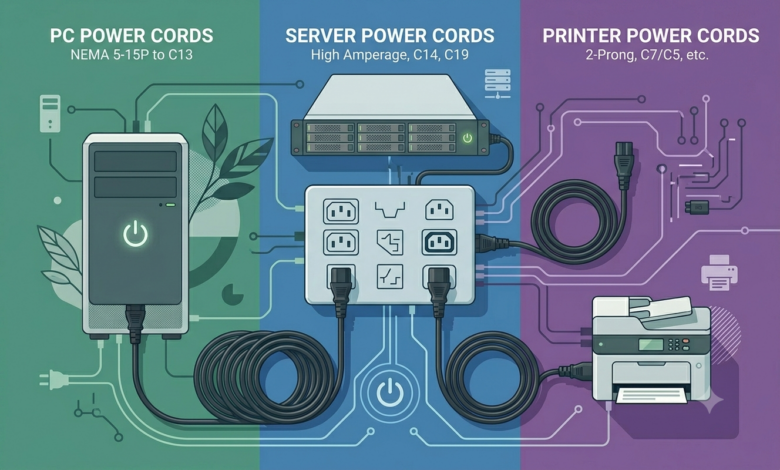
The 3-pronged plug connector into the back of the computer tower is plugged into a 3-pronged IEC C13 connector, which is plugged into a standard NEMA 5-15P cord plugged into the wall. They are widely available in a variety of lengths, from 3-feet to 15 feet.
If you use a high powered GPU or multiple drives, check the PSU wattage, and ensure the power cord is rated for it. In most homes and offices, a 10A/125V cord will suffice.
For Servers and Data Center Equipment
You’ll find that server power cords are more specialized. C13 and C19 are typical connectors for rack-mounted servers, depending on their power consumption. Some high-density servers with redundant power supplies may need to use C19 cords that can consume larger amounts of current.
In data centers that require C14 and/or C20 power outlets, IEC-to-IEC cords such as C14-to-C13 and/or C20-to-C19 are required. These are also known as “jumper cords” and are a must for rack installations that are neat and orderly.
Lock power cords (NEMA L-series) on critical infrastructure. They physically plug into the outlet and are impossible to pull out unless twisted, thus ensuring they will not fall out during maintenance or use.
For Printers
In most cases, office printers are either inkjet or laser, and are of either the C13 or C7 type, depending on their size and power needs. Large laser printers will practically always be connected with a C13 cord, just like desktop PCs. A C7 figure-8 cord is used in smaller inkjet machines.
When ordering a replacement cord, always see what type of inlet is required on the back of your printer. One of the most frequent errors with printer power cable replacement is the use of the wrong power connector.
Useful Special-Use Power Cords Found
These Are Hospital Grade Power Cords
These cords are designed to meet Medical Environment Safety Standards. They feature reinforced insulation and even higher-strength plugs than commercial cords, and are tested more rigorously. Hospital grade cords are not optional, if using in a hospital environment.
International Power Cords
For those traveling overseas with equipment or running an office network across the globe, you’ll need country specific power cords. The plug standard is different in the UK, Europe, Australia and Asia. Using the correct regional power cord is the better and solid option as there are no adapters that could add level resistance and heat.
Right-Angle Power Cords
A typical straight cord can be cumbersome or even a bending stress point in areas behind furniture, in equipment cabinets or in areas that do not provide clearance. Right angle power cords get the answer to this as they have the power cord plug exiting at a 90 degree angle, which means they can be routed nicely in small areas.
Rather Than That, Extension Power Cords and Splitters Are Available
Sometimes the outlet simply isn’t close enough. Power extension cords are a vital link to keep the original grounding circuit and rating, which is not the case with inexpensive house extension cords.
Before Buying a New Scooter, There Are Some Important Things to Look Out For
As you add a power cord to your cart, complete this fast checklist:
1. Check the Inlet on Your PC, Server or Printer
For connector type on the device. Is it a C13, C14, C19, or C7?
2. Outlet or PDU
What is being plugged into? The common wall socket, a locking port on the PDU or an IEC320 source?
3. Distance
Measure the distance from your device to the power source. Be a bit generous with the cord, if it is too tight, it will put tension on the connectors over time.
4. Amperes (Amp)
Match or exceed the power requirements of your device. Avoid using a low amp cord on a high-draw device.
5. Context
Is it an office at home, a hospital, an outdoor enclosure, or a data center? A particular type of cord or certification might be required for each environment.
Final Thoughts
Power cords are one of those items that you don’t think about unless you are in need of the correct cord and can’t find it. From replacing a lost cord to configuring a new server rack to building your home office workstation, knowing the different types of connectors, their ratings, and when and how to use them saves you time, money and possible hassle.
The fortunate part is that after you know what you’re searching for, you’ll know how to locate the suitable cord. SF Cable offers a variety of power cords to choose from ranging from standard NEMA and IEC options to hospital grade, international, locking and right angle cords in a variety of lengths and configurations.